
AI Design Made Easy: What Canva’s Latest Tools Mean for Event Planners
San Francisco Event Space News | 10/31/2025


Event planners wear a lot of hats—logistics pro, brand ambassador, creative director, and sometimes even graphic designer. But for many, there’s rarely enough time or staff to handle it all. That’s why Canva’s newest AI release is such a game-changer. With its latest suite of intelligent design tools, Canva is transforming how event professionals plan, promote, and produce experiences—especially for lean teams that need to move fast and look polished.
The Challenge for Today’s Event Planners
Corporate and tech event planners are managing more with less. Teams are smaller, budgets tighter, and expectations higher. Whether producing a developer summit or a company celebration at The Midway, visuals are expected to be sharp, on-brand, and ready across every channel—social, email, digital signage, and print. But not every team has a dedicated designer or agency partner to make that happen.
That’s where AI design automation comes in. Tools like Canva are giving event planners the power to generate professional-grade creative assets in minutes, without needing to learn complex software. It’s part of a larger movement in the industry toward AI-powered productivity—and it’s reshaping how events come to life.
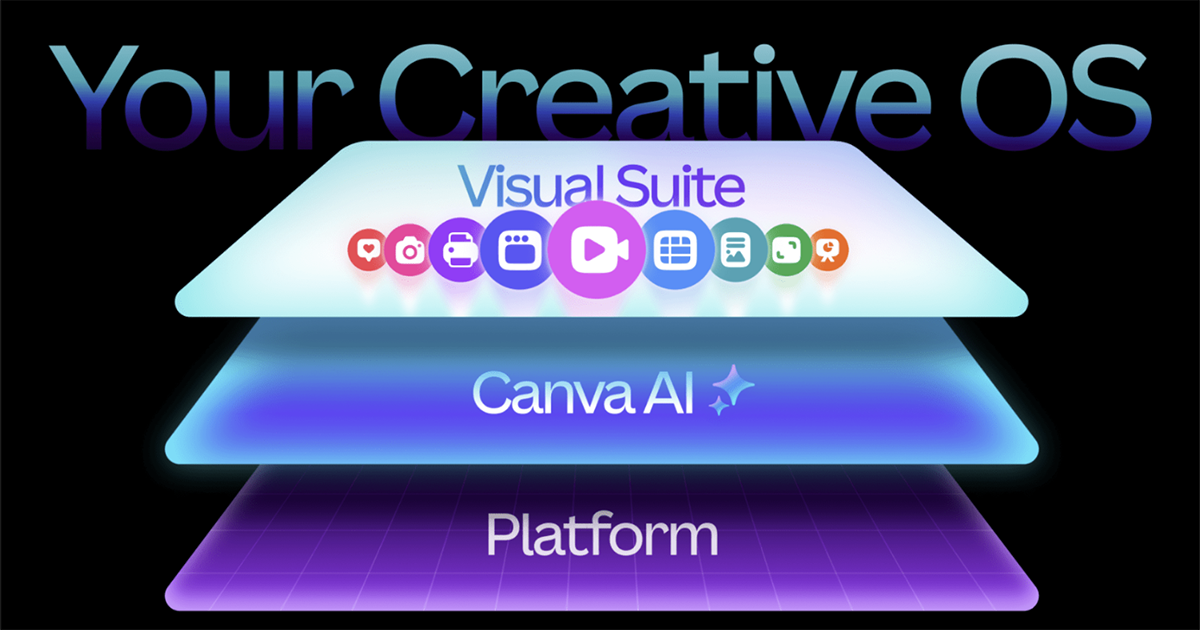
Canva’s AI Revolution: The Creative Operating System
In late 2025, Canva announced its biggest update yet—the launch of its new Creative Operating System. This release includes a new AI design model that understands layout, hierarchy, and style, enabling users to instantly generate cohesive branding across presentations, social media, and video. It’s a leap forward for non-designers, giving them access to tools that once required entire creative teams.
Canva’s latest features include:
- Magic Design: AI-generated layouts for any content type—perfect for signage, presentations, and session graphics.
- Brand Kit 2.0: Upload a company or event logo and let AI automatically apply color palettes and fonts across every asset.
- Video 2.0: Turn short clips or images into event recaps, countdowns, or sponsor highlights in seconds.
- AI Copy and Translation Tools: Create social captions, email copy, and multilingual materials without leaving Canva.
From Brainstorm to Launch: A Smarter Workflow for Events
For busy planners, the real power of Canva’s AI lies in workflow. Instead of starting from scratch for each event, users can prompt the AI to generate cohesive design systems that cover every phase—from save-the-date posts to on-site signage. A single event identity can now be applied consistently across digital and physical touchpoints.
Imagine producing an entire design kit for a conference at The Midway. With Canva’s AI tools, a planner could:
- Generate branded invitations and speaker announcements using Magic Design.
- Resize assets automatically for social media, newsletters, and screens in Ride or CarreSel.
- Design stage graphics, menus, and wayfinding signage with the same visual identity.
- Repurpose event photos and video clips into a branded post-event recap reel within minutes.
Inside The Midway: How AI Design Tools Streamline Event Production
The Midway’s spaces—Ride, CarreSel, Gods & Monsters, The Gallery, The Patio, and The Observatory—are designed for creativity and storytelling. With tools like Canva’s new AI suite, event planners can produce the kind of visual cohesion that makes every room feel connected. Need a digital display for a keynote in Ride? A menu for The Patio? Branded sponsor slides for The Gallery? Canva’s AI tools make it simple to stay consistent across every touchpoint, even under tight timelines.
For agencies and corporate planners hosting at The Midway, these AI capabilities mean less time spent on revisions and more focus on experience design. Teams can visualize floor plans, generate motion graphics, and align branding to the event’s theme—without waiting on a full creative turnaround.
The ROI: Time, Cost, and Creative Freedom
Every minute counts in event planning. Canva’s new AI tools directly impact productivity by cutting design time from hours to minutes. That not only saves money on outsourced design but also frees planners to focus on the elements that matter most—guest experience, logistics, and strategy. For venues like The Midway, that efficiency translates to smoother load-ins, more cohesive branding on-site, and happier clients who can focus on content instead of formatting.
In other words, AI tools like Canva aren’t replacing creativity—they’re expanding it. By automating the repetitive parts of design, they give planners space to think bigger, move faster, and craft more immersive experiences.
The Future of Event Design: Creativity Meets Automation
As AI continues to evolve, design automation will become a standard part of the event planner’s toolkit. Canva’s release signals a broader shift toward hybrid creativity, where humans set the vision and AI handles the execution. It’s the same mindset driving innovation across The Midway’s events—from developer summits to product launches to experiential brand activations.
For event planners, the takeaway is clear: embracing AI tools isn’t about cutting corners—it’s about amplifying capability. With Canva’s new AI-powered Creative Operating System, every planner now has access to a design team in their pocket.
Explore more from our AI in Event Planning series | Plan your next event at The Midway
Looking for Event Space in San Francisco?
Let us know how we can help with your organization’s event needs. The Midway customizes events of all types and sizes with our versatile spaces, culinary options, and technological know-how for maximum impact and a successful experience.
Whether you are in early planning stages or interested in discussing specifics, please contact us for more info.
A FEW OF OUR CORPORATE EVENT CLIENTS
























RELATED CONTENT